Test Index · Photo Borders · Table of sliced images - Rounded corners · Sliced images and manually linked · Overlap Images · Create a Watermark · Gif Png Transparency · Buttons-Image Links · Image Names · Image Theft · Lake Applet · Other applets · Slideshow1 · Slideshow2 · Slideshow3 · Galleries · DD Thumbnail Viewer · image map · xara thumbnail · Random Image · LOGO BRANDING · Animated Image · photo with sound
Animated Image
Do you want a moveable banner, an ad or cartoon on your site? Consider an animated gif image.
Here's a few samples of what can be done:
BANNER 1 - made for a fellow CSB4 user to advertise his website.
|
||||
 |
||||
BANNER 2
|
||||

|
||||
BANNER 3
|
||||

|
||||
ADS - Made in programs by JASC: Animation Shop and Paint Shop Pro
If you use transitions, adjust the number of frames down so they stay fast!
|
||||
 |
||||
Here are ADS that get around the ad stopper programs!
Ad stoppers often delete animated gif images as nonsense ads. Try this trick:
This is a fake ad. Animated image in the center of a table that has a background the same color. Text is placed in the table so even if the image is removed by an ad stopper program, the text and link stay to see the product! (linked back to this page)
How its constructed:
How the ad is cut with Ad Stopper programs!
Only the animation is removed, the link and ad remain instead of losing it all!
|
||||
CARTOON (silly images) - (Dancing Gerbils also used on other applet page)
|
||||



|
||||
|
||||






BONUS!! SIMPLE SCROLLING TEXT
Place this code into an Insert > HTML (or Webgem in Trellix) (you can change colors, border size, text!)
<marquee style="color: rgb(255,255,255); font-weight: bolder; font-style: normal; font-family: Georgia; border: 1px solid" bgcolor="#660099" border="2"> SIMPLE MARQUEE!! Just one line of code!</marquee>
|
You can use any of the other attributes shown below in RED to adjust the simple code above. Yes, they can be combined, mixed and matched as you see fit!
|
Want to adjust the speed? SIMPLE SCROLLING TEXT
Place this code into an Insert > HTML (or Webgem in Trellix) (you can change colors, border size, text!)
<marquee scrollamount=5 scrolldelay=10 style="color: rgb(255,255,255); font-weight: bolder; font-style: normal; font-family: Georgia; border: 1px solid" bgcolor="#660099" border="2"> SIMPLE MARQUEE!! Just one line of code!</marquee>
Adjust the scrollamount and scrolldelay higher (from 1 to 500).
Optimal speed seems to be about scrollamount=5 and scrolldelay=10 as shown in the example above.
Warning!
A high scrolldelay number makes the scroll stutter! scrollamount=5 and scrolldelay=500 shown below:
A high scrollamount number makes the scroll ZOOM past! scrollamount=50 and scrolldelay=5 shown below:
|
Want to adjust which side the text scrolls from? SIMPLE SCROLLING TEXT
Place this code into an Insert > HTML (or Webgem in Trellix) (you can change colors, border size, text!)
<marquee direction=right style="color: rgb(255,255,255); font-weight: bolder; font-style: normal; font-family: Georgia; border: 1px solid" bgcolor="#660099" border="2"> SIMPLE MARQUEE!! Just one line of code!</marquee>
Adjust the direction to the right or the left, left is default so it can be left out!
|
Want to have the text bounce back and forth? SIMPLE SCROLLING TEXT
Place this code into an Insert > HTML (or Webgem in Trellix) (you can change colors, border size, text!)
<marquee behavior=alternate style="color: rgb(255,255,255); font-weight: bolder; font-style: normal; font-family: Georgia; border: 1px solid" bgcolor="#660099" border="2"> HOW SIMPLE IS THIS! </marquee>
Add the behavior=alternate code to make your marquee bounce!
|
So, how do you put these little bits of moving magic into your site?
 Instructions for animated images Instructions for animated images |
|
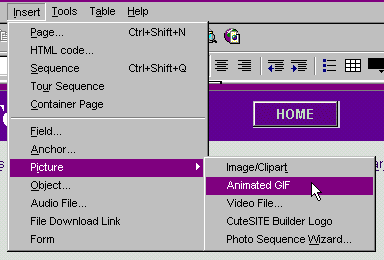
1) CSB: On the menu, choose Insert > Picture > Animated Gif (Trellix: Click Webgem, for animated)
|
|
 |
|
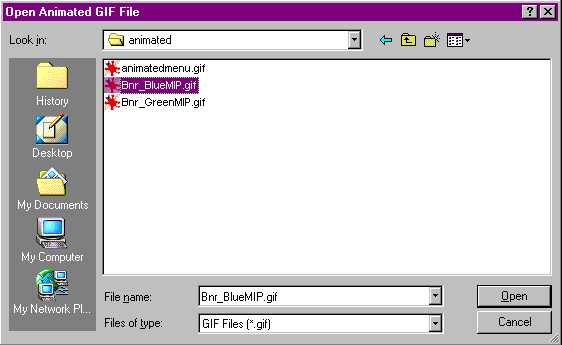
2) Choose the file to insert
|
|
 |
|
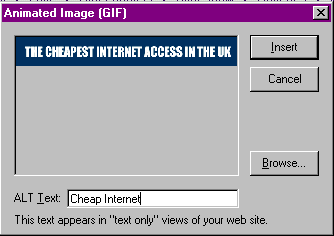
3) Type in an ALT TAG (three purposes: title hovers over image on mouseover, used by search engines, browsers that can not display an image will show the ALT TAG instead)
|
|
 |
|
That's it!!! SO SIMPLE!!
|
|
LINK the image: Right click the image, choose Create a link to URL or File
|
|
Instructions for FLASH images How to insert a flash into CSB page
 Use program to make flash & produce code.Edit code: place ^GEMDIR/ in front of the flash file name Use program to make flash & produce code.Edit code: place ^GEMDIR/ in front of the flash file name (myflashfile.swf, becomes ^GEMDIR/myflashfile.swf)
Place code into an INSERT HTML (Webgem in Trellix)Place flash file into the WEBCOMPONENTS part of the INSERT HTMLPublishThe PREVIEW function can interfere with publishing! When you publish make sure you UNCHECK the option to publish to a local HTML file. If you do that, your HTML-obj folder will publish fine. [This box is helpful as a setting for previewing your site, but not for publishing your site!]
File > Publish web site > Options > HTML Directory > Uncheck this box when you publish.
|