Test Index · Photo Borders · Table of sliced images - Rounded corners · Sliced images and manually linked · Overlap Images · Create a Watermark · Gif Png Transparency · Buttons-Image Links · Image Names · Image Theft · Lake Applet · Other applets · Slideshow1 · Slideshow2 · Slideshow3 · Galleries · DD Thumbnail Viewer · image map · xara thumbnail · Random Image · LOGO BRANDING · Animated Image · photo with sound
Galleries:
There are so many different ways to display your images.
Consider my 2 designs Filmstrip and iFrame or one from Curtis
all were made to save your visitors
mouse clicks & have no pop-up windows!
 |
||||
STYLE 1: FILMSTRIPThese three galleries have some terrific benefits:
 Very easy if you can build one table in CSB.Can add any comment you want under, beside photos or above large photos. Can have any color combination you want. Can have any background image you want for the large image. Your large picture can be a lot bigger than mine. Only have to make 2 page styles! The "index" with the thumbnail images, andThe "content" page that is copied several times-each content page has one large image. Title of page appears on middle frame (I titled and named my pages the same as the picture number on film roll) Once you get the format set, you can just clear the images and reload for a second gallery. No code needed unless you want to change the colors of your scrollbars like I did and that's just changing colors! Optimize/thumbnail photos outside of CSB! Very easy if you can build one table in CSB.Can add any comment you want under, beside photos or above large photos. Can have any color combination you want. Can have any background image you want for the large image. Your large picture can be a lot bigger than mine. Only have to make 2 page styles! The "index" with the thumbnail images, andThe "content" page that is copied several times-each content page has one large image. Title of page appears on middle frame (I titled and named my pages the same as the picture number on film roll) Once you get the format set, you can just clear the images and reload for a second gallery. No code needed unless you want to change the colors of your scrollbars like I did and that's just changing colors! Optimize/thumbnail photos outside of CSB!To make QUICK thumbnails, I recommend this free program:
Easy Thumbnails and KW has a simple tutorial
|
CLICK IMAGE TO SEE A GALLERY
|


MAKE YOUR OWN GALLERY! All the galleries use the same techniques:
STEP A: INDEX
 Create an INDEX page. This will be the home page (index) for the gallery. Make a border at right (1), top (2), bottom (3) my samples have margins =1Build a table inside that border to fit your thumbnails. Put one thumbnail in each cell of the table.You can put a small label under each thumbnail. I used numbers: Create an INDEX page. This will be the home page (index) for the gallery. Make a border at right (1), top (2), bottom (3) my samples have margins =1Build a table inside that border to fit your thumbnails. Put one thumbnail in each cell of the table.You can put a small label under each thumbnail. I used numbers:  10 11 10 11These are my settings, yours may be different to suit your images
Some people use much smaller thumbnails than I show.
And I had my monitor set to 800x600 while building.
If you have a higher resolution, you can adjust as necessary to fit YOUR screen best
The middle section of the index page will have a description of the gallery or whatever message you want to have. (If you want to return to this page after you are done with the photos, make the last item in the last table cell link back to this index page. I included a way to get to a form and instruction to close the page when done.) Here are my three index pages: STEP B: CONTENT
Create a CONTENT page. It's simply any other page in your tlx file that is different than your index page! It will hold a large image. This page will load into the middle section when you click on a thumbnail. Point to your map, right click and Insert page. That's all! How should it look? That's totally up to you! You design it any way you want. Choices for options like borders (use a border, 4 borders, no borders), background (use plain white, a color, or image) are completely up to you. I used margins = 1 to maximize space.
Please visit this page and glance at the map below! For reference, take a look at my three versions:
1 right large image with border all around. Equally attractive with no borders!
2 thumbnail on top with bottom border 24 px for name of file
3 thumbnail on bottom with top border 24 px for name of file.
Now make several copies of this empty content page:Click the page on the map and right click your mouse, choose COPY (or Ctrl C)Now point the mouse to the map and right click your mouse, choose PASTE (or Ctrl V)Paste another, Paste another, Paste another until you have one page for each of your thumbnail images (15 images, then you need 15 empty content pages).Now give each of these content pages a different name Right click, Properties > Page Put the name in the short name field.
I used numbers as the name of the page: 10, 11, etc. (they are easiest and fastest to write).
Now place a large image and description into each of the content pages. Ex: Put large picture 10 in content page 10, etc..in the same order as your thumbnails you put in to the index page. Include any description for the image on the content page too. (usually below the image)This is the way your map should now look (without the notes of course, and no form page unless you want one).
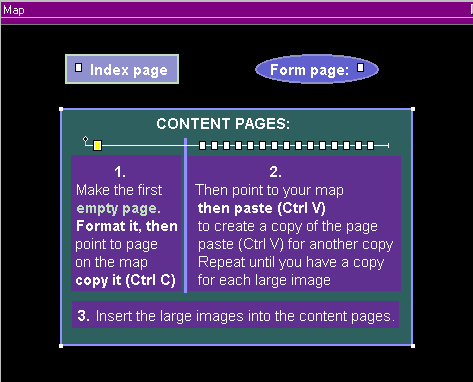 STEP C: LINK & PUBLISH
Set each thumbnail image to open in the MIDDLE frame of the index page. On the index page, right click a thumbnail > Create a Link to URLIn CSB4: type in the url (use the page name) and use the target dropdown example link: 10.htm target drop down: TRLX_Middle
In CSB3 or Trellix: type in your url (use the page name), then target behind, but do not close the quote. The program will do it for you.example link: 10.htm" target="TRLX_Middle
Publish this tlx file to a NEW subdirectory. I used: gallery020103 as a subdirectory name so I know when the photos were taken. In the publishing options, check off that you want to publish to a subdirectory and name it The very first time that you click to publish that tlx design file, CSB will connect to your website, check for your subdirectory and not find it. CSB will make the folder then upload the web pages to your new subdirectory! Your main site is not disturbed.YOU MUST PUBLISH WITH HTML FRAMES. The gallery links will not work unless you have frames on. Under the publishing options, check the box for FRAMES. (Want to understand more about frames? Visit this page to see demos with and without frames, and more...)
Tweak if necessary for the result you want. Want to make more of these galleries? Use File Save As to create a new copy of the file. Use Edit > Page Format to modify the color of the background etc FAST to make another gallery of the same style, but different color, or leave it the same and reload images. Publish each gallery to it's own subdirectory! |
(Thank you Colin for providing feedback on this tutorial, also provided the images used for XARA thumbnail page.)
Additonal options to make your gallery different:
OPTION 1: Open your gallery in a larger window. Open your gallery turning off menubar, etc. so the window is larger for better viewing. Works well with Right and TOP formats. (The scrollbar disappears under the start menu when used with Bottom but can still be done.) Load this code into an Insert > HTML and put the image you want to use as your clickable button into the webcomponent. Change gallery and image:
<A HREF="javascript:void(0)"
ONCLICK="open('../gallery020103/', 'miniwin', 'toolbar=1, location=0, directories=0, status=0, menubar=0, scrollbars=1, resizable=1, width=790, height=560')"><img src="^GEMDIR/gallery3top-tn.jpg"></A>
|
OPTION 2: Change your scroll bar colors. I made my track the same color as my page to blend. The scrollbar is the same purple used in the page.
Load this code into an Insert > HTML Change scrollbar and track colors.
<style>
<!--
BODY{
scrollbar-face-color:#9898D0;
scrollbar-arrow-color:indigo;
scrollbar-track-color:#C0DCC0;
scrollbar-shadow-color:'';
scrollbar-highlight-color:'';
scrollbar-3dlight-color:'';
scrollbar-darkshadow-Color:'';
}
-->
</style>
|
Would you like to see other sites that have applied one of my filmstrip gallery designs (above)?
Beth has made several beautiful Scotland galleries (her own images) (for 800x600)
(These are temporarily offline for renovation...)
Rick shows off a dream in this gallery (unlike most of us, his ship really has come in...) (for 800x600 - full size page)
Kate Blake has this wonderful black and deep green version (for 800x600)
|
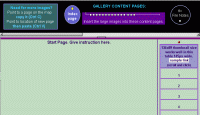
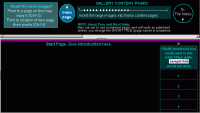
 thumbnail table with space for 15 images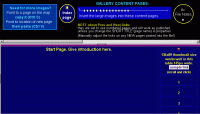
 STYLE 2: Implement A Mini Gallery Viewer from Curtis
Mini Gallery version 1 - Curtis
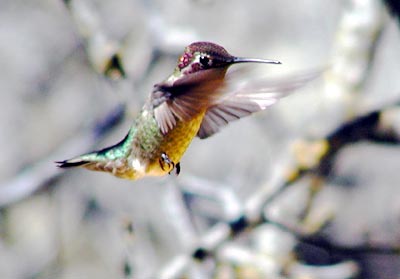
 Click a thumbnail, see larger image.
CODE: (use either)
|
Mini Gallery version 2 - Sam
 Modifications:
 click statement, see example - thumbnails are different than large imageno dotted line around linked imagecenter image starts on different image click statement, see example - thumbnails are different than large imageno dotted line around linked imagecenter image starts on different image |
;) |
;) |
;) |
;) |
 | |||
;) |
;) |
;) |
;) |
^GEMDIR in code - put pictures into webcomponent
To capture the code, press Select All then COPY the contents.
MUST change each gEMDIR to GEMDIR before using code!
<SCRIPT language=JavaScript>
<!-- Original: Jenny Blewitt (webmaster@webdesignsdirect.com) -->
<!-- Web Site: http://www.webdesignsdirect.com -->
<!-- This script and many more are available free online at -->
<!-- The JavaScript Source!! http://javascript.internet.com -->
<!-- Begin
browserName = navigator.appName;
browserVer = parseInt(navigator.appVersion);
ns3up = (browserName == "Netscape" && browserVer >= 3);
ie4up = (browserName.indexOf("Microsoft") >= 0 && browserVer >= 4);
function doPic(imgName) {
if (ns3up || ie4up) {
imgOn = ("" + imgName);
document.mainpic.src = imgOn;
}
}
// End -->
</SCRIPT>
<!-- STEP TWO: Copy this code into the BODY of your HTML document -->
<CENTER>
<TABLE cellSpacing=0 cellPadding=0 width=360 border=0>
<TBODY>
<TR>
<TD><A href="javascript:doPic('^GEMDIR/p1.jpeg');"><IMG height=60
src="^GEMDIR/p1.jpeg" width=90
border=0></A></TD>
<TD><A href="javascript:doPic('^GEMDIR/p2.jpeg');"><IMG height=60
src="^GEMDIR/p2.jpeg" width=90
border=0></A></TD>
<TD><A href="javascript:doPic('^GEMDIR/p3.jpeg');"><IMG height=60
src="^GEMDIR/p3.jpeg" width=90
border=0></A></TD>
<TD><A href="javascript:doPic('^GEMDIR/p4.jpeg');"><IMG height=60
src="^GEMDIR/p4.jpeg" width=90
border=0></A></TD></TR>
<TR>
<TD align=middle colSpan=4><IMG height=240
src="^GEMDIR/p1.jpeg" width=360 border=0
name=mainpic></TD></TR>
<TR>
<TD><A href="javascript:doPic('^GEMDIR/p5.jpeg');"><IMG height=60
src="^GEMDIR/p5.jpeg" width=90
border=0></A></TD>
<TD><A href="javascript:doPic('^GEMDIR/p6.jpeg');"><IMG height=60
src="^GEMDIR/p6.jpeg" width=90
border=0></A></TD>
<TD><A href="javascript:doPic('^GEMDIR/p7.jpeg');"><IMG height=60
src="^GEMDIR/p7.jpeg" width=90
border=0></A></TD>
<TD><A href="javascript:doPic('^GEMDIR/p8.jpeg');"><IMG height=60
src="^GEMDIR/p8.jpeg" width=90
border=0></A></TD></TR></TBODY></TABLE></CENTER>
|
manual ftp upload of folder galleryc To capture the code, press Select All then COPY the contents.
<SCRIPT language=JavaScript>
<!-- Original: Jenny Blewitt (webmaster@webdesignsdirect.com) -->
<!-- Web Site: http://www.webdesignsdirect.com -->
<!-- This script and many more are available free online at -->
<!-- The JavaScript Source!! http://javascript.internet.com -->
<!-- Begin
browserName = navigator.appName;
browserVer = parseInt(navigator.appVersion);
ns3up = (browserName == "Netscape" && browserVer >= 3);
ie4up = (browserName.indexOf("Microsoft") >= 0 && browserVer >= 4);
function doPic(imgName) {
if (ns3up || ie4up) {
imgOn = ("" + imgName);
document.mainpic.src = imgOn;
}
}
// End -->
</SCRIPT>
<!-- STEP TWO: Copy this code into the BODY of your HTML document -->
<CENTER>
<TABLE cellSpacing=0 cellPadding=0 width=360 border=0>
<TBODY>
<TR>
<TD><A href="javascript:doPic('galleryc/p1.jpeg');"><IMG height=60
src="galleryc/p1.jpeg" width=90
border=0></A></TD>
<TD><A href="javascript:doPic('galleryc/p2.jpeg');"><IMG height=60
src="galleryc/p2.jpeg" width=90
border=0></A></TD>
<TD><A href="javascript:doPic('galleryc/p3.jpeg');"><IMG height=60
src="galleryc/p3.jpeg" width=90
border=0></A></TD>
<TD><A href="javascript:doPic('galleryc/p4.jpeg');"><IMG height=60
src="galleryc/p4.jpeg" width=90
border=0></A></TD></TR>
<TR>
<TD align=middle colSpan=4><IMG height=240
src="galleryc/p1.jpeg" width=360 border=0
name=mainpic></TD></TR>
<TR>
<TD><A href="javascript:doPic('galleryc/p5.jpeg');"><IMG height=60
src="galleryc/p5.jpeg" width=90
border=0></A></TD>
<TD><A href="javascript:doPic('galleryc/p6.jpeg');"><IMG height=60
src="galleryc/p6.jpeg" width=90
border=0></A></TD>
<TD><A href="javascript:doPic('galleryc/p7.jpeg');"><IMG height=60
src="galleryc/p7.jpeg" width=90
border=0></A></TD>
<TD><A href="javascript:doPic('galleryc/p8.jpeg');"><IMG height=60
src="galleryc/p8.jpeg" width=90
border=0></A></TD></TR></TBODY></TABLE></CENTER>
|
This script is modified. Visit Curtis' website for his version.
(cmg02.com/scripts/gallery.htm is currently offline)
3) iFrame Gallery is on a separate page without a top border to allow for more space.