Sami's Site: CSB - Trellix Support and Tests
|
  |
CSB4 Rollover Links · Link Styles 1 · Link Styles 2 · Arrowhead · Websafe Fonts and tests · LINK HOVER TOOLTIP · OverLIB tooltip
CSB4 Rollover Links
CSB4 has a new feature. It allows you to have a hover (mouseover) effect on links. Change the color or the text, the font, the background color (causing a highlight effect). Here are a couple sample rollover links made with CSB4:
The text in the sample is Times New Roman, but the link becomes Arial on rollover.
 link put in using Create a URL: home link put in using selection on map: websafe fonts
To access the settings:
Right click page > properties > page area > HTML link colors
Here are the settings I used on this page:
This page is published without frames so I have set only the page body with link settings, didn't touch the border settings!
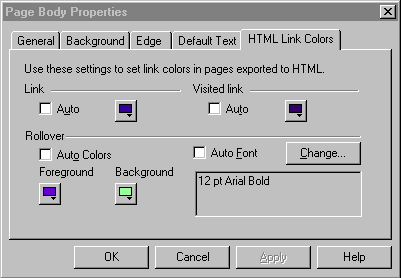
Notes:
 My regular settings for links are 3 shades of blue (shown on the first line). These are standard colors in the format and were not changed on the individual page.When publishing with frames it is often necessary to change all the borders to the same setting to get the rollover to work, even if the borders are not being used. Right click page > properties > page > choose page area to access the borders.TROUBLESHOOTING: This feature can be finicky! Sometimes it works the first time, sometimes it takes tweaking!Settings won't stick? Try starting with a new page. Click on the map and choose Insert page. DO NOT change the Link and Visited link colors if you are planning to use highlighting - sometimes interfers (not always).DO NOT COMBINE inserted code on the same page that would change your underline, or hover effects as it can interfer!)Try closing the tlx file and reopening before working on the settings.If All else fails, take a look at these two pages for codes that can be used instead: