Make a double border- detail test: (other test page links)
How it will look: Click on links above to see it in action.
1st border = TopBorder = white
|
|
2nd border = Names = Red
|
|
left
|
middle
links here can either:
 change this area and leave the two borders alone, orleave top border and change the rest of the page! change this area and leave the two borders alone, orleave top border and change the rest of the page! |

How to do it:
Make one main page like this page:
Make one page per person that looks like this: NAME PAGES (see one in a full window)
2nd border = Names = Red
|
|
left
|
middle
basic information about the person
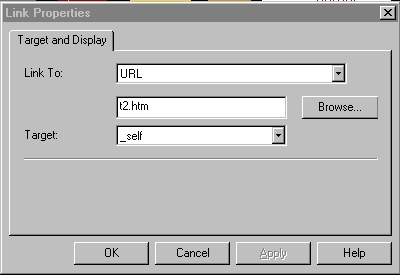
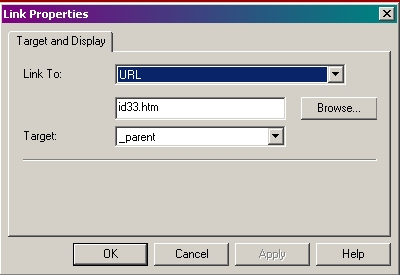
 To change this full page to another person, links here use target="_parent"To keep the red name border, but change the middle gray content for the person, link to a plain page (no borders) using: target="TRLX_Middle" To change this full page to another person, links here use target="_parent"To keep the red name border, but change the middle gray content for the person, link to a plain page (no borders) using: target="TRLX_Middle" |
(no borders) just content.
Use a table to make sure content fits the middle area.
|
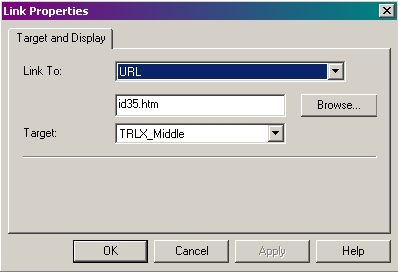
Make a first page using a top border, like shown above.All links in the first page should be set to open target set to TRLX_Middle so those pages open under the white top border of this page.Manually place your links using a URL style link so you have access to the targetCan't use the sequence list since it does not allow for assignment of targetThe top border (white) remains static and is not changed.The linked NAME pages also have a top border. Use Format Page Layout to create a new page layout specifically for these pages that will go under the first border. Change the border color (I used red), etc. These pages can have the border unlocked and changed on an individual page. (I changed the red border to show 3 different namesThe three links on the white border will open under the white page border and show a double border!The links on the NAME pages eitherchange the detail page for a person, oropen a different NAME page (not the best way to do it but it can be done)For reference, check out the SITE MAP to see the way the pages are grouped togetherPlace your cursor to the top edge of the page, between the header of the webpage page and the beginning of your browser menus. Your cursor will change to a double headed arrow. Hold down your left mouse button and drag down.
SETTINGS for all links in the 1st main page border:
(each with different page id)
|
 |
SETTINGS for to open new detail window - keep same name and double border:
 SETTINGS for to open under the double border - change name:
(if you want their links to open under the 1st white border too)
 |
visit other test pages: Test Index · Table 1 · Table 2 · Table 3 · Table 4 · Table 5 · Table Firefox · table css · Layered Tables · Resort Table · Background Image in Table · Selection Guides · Folding Menu Tree · Menu Buttons · Hidden Site Map · Anchors · Double Border Detail